
Markdown / LLM-ready output
Turn any page into clean Markdown instead of a wall of HTML — the feature Firecrawl and Crawl4AI are known for, now in the Laravel world. The result drops straight into an LLM context window or a RAG index with no HTML noise.
There are two ways to use it, and they pair naturally: extract an article body as a Markdown field, then export the whole crawl as a Markdown document.
1 · The markdown field type
Render one element's content (an article body, a product description — any long-form block) as Markdown by setting the field's type to "markdown". The css selector locates the element; its content is converted:
{
  "name": "description",
  "css": ".product-description",
  "type": "markdown"
}
What the converter preserves and strips:
| Preserved | Stripped |
|---|---|
Headings (#–######), paragraphs, <br> | <script>, <style>, <noscript>, <template> |
| Nested & ordered lists | Forms, buttons, inputs |
| Links and images | Media embeds (<iframe>, <video>, <svg>, …) |
Bold / italic / inline code | Site chrome: <nav>, <header>, <footer>, <aside> |
Fenced code blocks with language (```php) | |
Tables (with | escaping) and blockquotes |
Relative URLs are resolved
Links and images inside the converted content are resolved against the page they were scraped from — [Foo](/wiki/Foo) becomes [Foo](https://example.com/wiki/Foo) — so the Markdown stays valid outside its origin site.
Use an empty css ("") in detail_fields[] to convert the whole detail page context, or point it at the main content container for article-only output.
Note: regex is not applied to markdown fields — it would corrupt multi-line output.
2 · The markdown output format
Export a whole crawl as a single Markdown document, one section per item. Set the blueprint's output_config.format:
"output_config": {
  "format": "markdown"
}
php artisan datahelm:scrap:run example --output=storage/app/scrapes/example.md
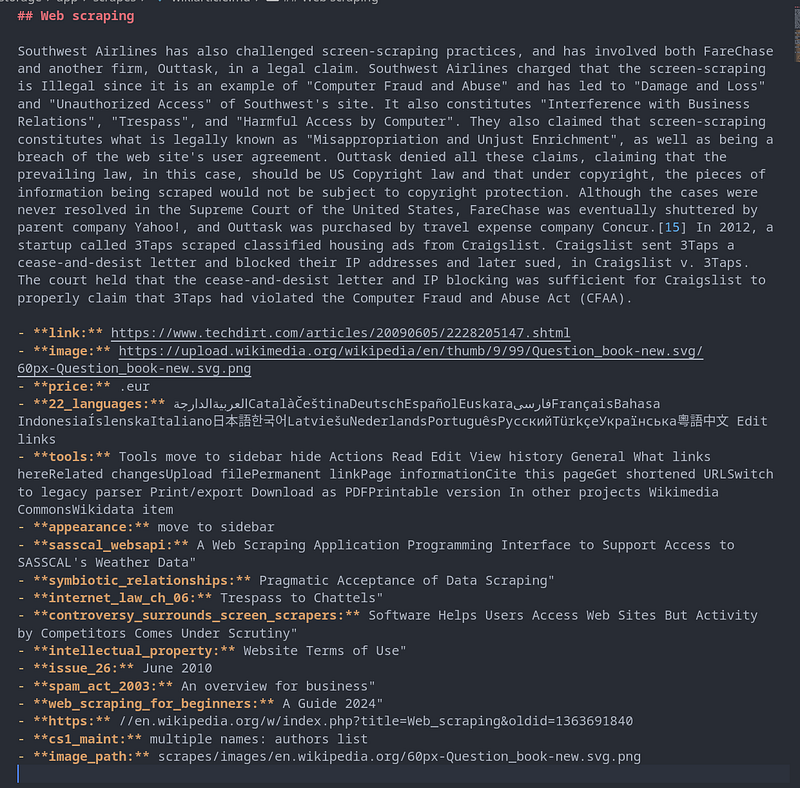
Each item becomes a section:
- Heading — the most title-like field (
title,name,heading,headline,label), falling back toItem N. - Body — the first long-form field (
markdown,content,body,description,text), rendered as-is. - Metadata — every remaining scalar field as a bullet list (
- **price:** 150000). - Items are separated by
---horizontal rules.
Now the robot generates a .md file containing the scraped page's content, formatted as clean Markdown instead of raw JSON.
When a robot's blueprint has output_config.format = "markdown" (set via --output-format=markdown at generate time), running the robot produces a single Markdown document per crawl:
- A
##heading (from the page'stitlefield) - The main body text as readable prose
- Any remaining scraped fields listed as
- **field:** valuebullets below
This is meant to be dropped directly into an LLM's context window or a RAG index — no HTML tags, scripts, or site chrome to strip out first, unlike the default json format, which just dumps each field as a raw key/value pair.
Example output for a scraped page: